Open Sesame - I Now Have to Ask My Internet Router to Give Me Internet
I have a problem. It’s 11 PM, I tell myself “just five more minutes of Reddit” and suddenly it’s 2 AM and I hate myself. Sound familiar? After years of failing to fix this with willpower alone (spoiler: willpower doesn’t work against billion-dollar engagement algorithms), I decided to solve it the only way I know how: by overengineering the hell out of it.
The result? My router now interrogates me like a strict parent whenever I want internet after 9 PM. If I can’t convince an AI that I actually need to be online, no internet for me. Yes, I built my own digital bedtime enforcer. No, I’m not proud of how necessary this was.
Video Demo
The Problem
Between 9 PM and 5 AM, my internet usage is basically 95% garbage. Social media, YouTube rabbit holes, Reddit arguments with strangers – you know the drill. The thing is, I know this while I’m doing it. But somehow at 1 AM my brain goes “yeah but what if there’s one more interesting thread” and before I know it the birds are chirping outside.
What I wanted was simple:
- Block internet at night (no exceptions button I can just click)
- Force myself to explain why I need access
- Have something more objective than my 1 AM brain decide if that’s legit
- Time limits so I can’t abuse a single approval for hours
The Hardware
I grabbed a GL.iNet GL-MT3000 (Beryl AX) travel router for about 60 Euro. It runs OpenWrt, has enough storage for Python, and sits between all my devices and the actual internet. This is important – there’s no way to bypass it without physically unplugging it (and at that point, if I’m that desperate, maybe I deserve the internet).
How It Works
When I connect to WiFi after 9 PM, instead of getting internet I get a chat interface. An AI (Google’s Gemini) asks me why I need access. The conversation goes something like:
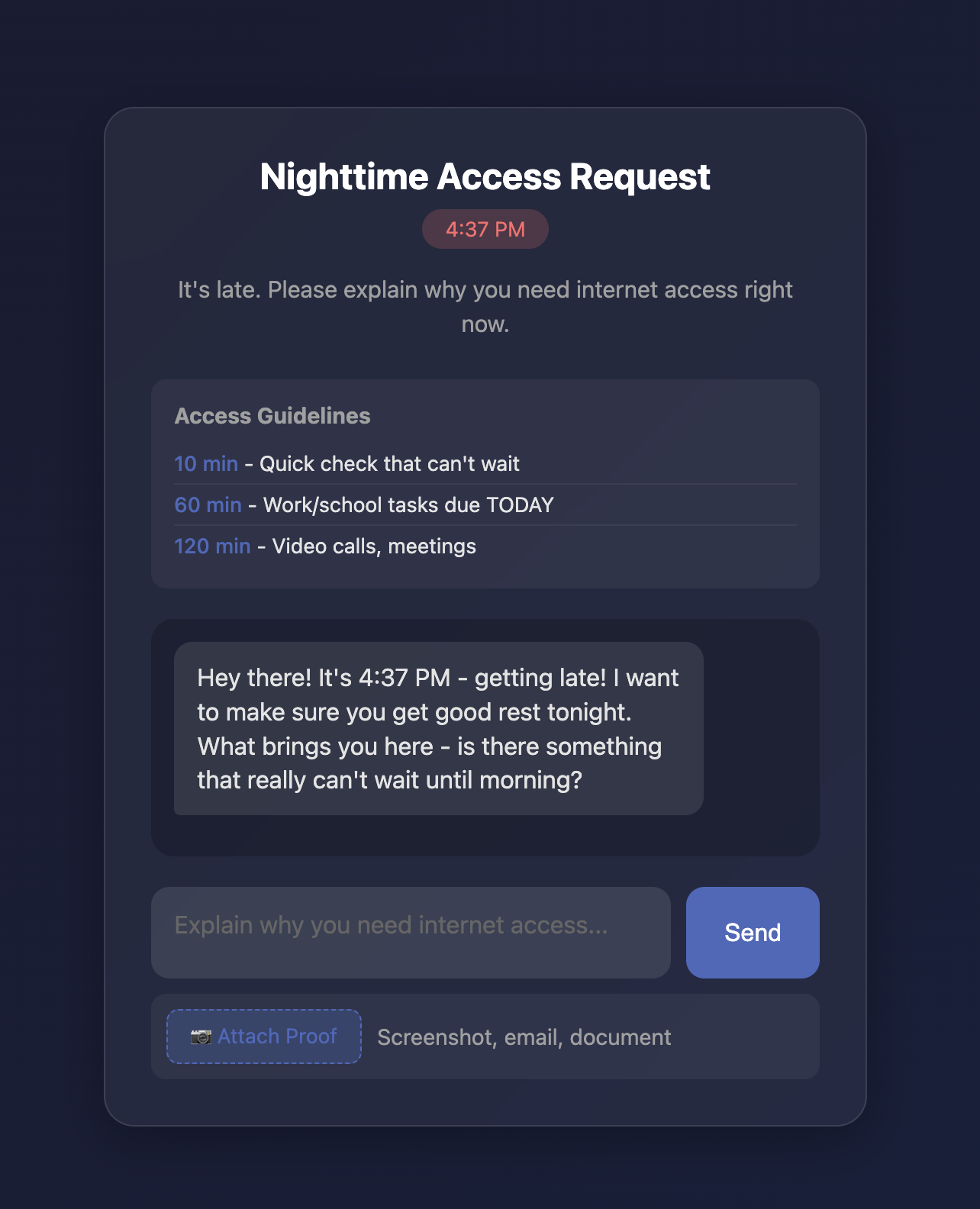
AI: “It’s 11:30 PM. Why do you need internet access?”
Me: “I need to check email.”
AI: “How many minutes do you need?”
Me: “30 minutes.”
AI: “Why specifically 30 minutes? What will you be doing?”
And here’s the thing – having to actually type out “I want to mindlessly scroll Twitter” makes you realize how stupid that sounds. Half the time I just give up and go to bed instead. Which is exactly the point.
The AI grants different amounts of time based on what you need:
- 10 minutes for quick checks
- Up to 60 minutes for actual work due TODAY
- Up to 120 minutes for video calls
For anything over 10 minutes, it wants proof. Screenshot of that urgent email? Calendar invite for that meeting? Upload it. The AI actually looks at the image and checks if it matches what you claimed. No more “I have work stuff” as a universal excuse.
The Technical Bits
If you care about the implementation (if not, skip to the Claude Code section):
The whole thing is a Python script running on the router. It does DNS hijacking so all domains point to the router, then redirects HTTP traffic to a captive portal page. When you’re chatting with the AI, your messages go to Google’s Gemini API. If approved, it adds iptables rules to let your specific device through for the approved duration.
# All DNS queries resolve to router
uci add_list dhcp.@dnsmasq[0].address='/#/192.168.8.1'

# All HTTP goes to captive portal
iptables -t nat -I PREROUTING 1 -i br-lan -p tcp --dport 80 -j REDIRECT --to-port 2050

# Block actual internet access
iptables -t filter -I FORWARD 1 -i br-lan -o eth0 -j REJECT
The system also keeps a log of all my requests throughout the night. So if I’ve already asked three times, the AI gets more skeptical. “You already got approved twice tonight, why do you need more time?” It’s like having a disappointed parent watching over your shoulder.
Cron jobs handle the scheduling – gatekeeper mode enables at 9 PM, disables at 5 AM. Even rebooting the router at midnight doesn’t help, it comes back up in restricted mode.
Source code: github.com/kryptokommunist/open-sesame
Built with Claude Code in One Evening
Here’s the part that blows my mind: I built this entire thing in a single evening using Claude Code. Normally a project like this would involve days of reading OpenWrt docs, fighting with iptables syntax, debugging why the captive portal won’t show up, etc. Instead I just told Claude what I wanted and it SSHed into the router, figured out the constraints, and wrote the code.
The workflow was basically:
- Me: “I want an AI-gated internet system on this router”
- Claude: checks router specs, proposes architecture
- Me: “The captive portal isn’t showing”
- Claude: debugs iptables, finds issue, fixes it
- Me: “Now add image proof for longer requests”
- Claude: adds file upload, integrates multimodal API
Each iteration took minutes. I steered, Claude implemented.
Where Claude Code Screwed Up
Let me be clear though – it wasn’t magic. Some real bugs I had to catch:
Bug 1: After setting up DNS hijacking (all domains → router IP), the captive portal showed the router’s admin UI instead of my splash page. Claude had excluded the router IP from the redirect, but with DNS hijacking everything pointed to the router IP, so nothing got redirected. I had to point out the wrong page was showing before Claude figured it out.
Bug 2: The AI couldn’t reach Google’s servers because… my own DNS hijacking was hijacking the API hostname too. Claude first tried hardcoding the IP (broke SSL). Eventually got a proper fix: resolve via external DNS, then monkey-patch Python’s socket handling. Took a few iterations.
The pattern: Claude optimized for the immediate problem without seeing how it’d interact with other parts. Classic AI coding issue. The workflow that actually works is AI implements, human validates. I couldn’t have built this in an evening alone, but Claude couldn’t have shipped it without me catching these bugs. We’re in the centaur phase of AI coding.
Does It Actually Work?
Yeah, embarrassingly well. The friction of having to justify myself to an AI is surprisingly effective. When I’m about to type “I just want to browse Reddit” I realize how pathetic that sounds and often just go to bed. Which was the whole point.
Update: Daytime Features
After using this for a few days, I wanted the same focus superpowers during the day too. So I added daytime features:
Focus Mode: One-click blocking of distracting sites (YouTube, Instagram, Twitter, etc.). Uses both DNS and IP firewall blocking – so you can’t bypass it by using the IP address directly. Customize which sites get blocked via a settings page.
Voluntary Lockdown: Full internet block during daytime – same AI chat to get back online. For deep work sessions where you want zero distractions.
Stats Dashboard: Charts showing usage patterns over time. Scatter plot shows request times and durations. Bar chart breaks down by weekday. Night/Day tabs let you see nighttime requests separately from daytime Focus Mode and Lockdown usage.
The UI also theme-switches – golden during the day, dark at night. Nice visual cue for which mode you’re in.
TL;DR: Built an AI that guards my internet at night because I have zero self-control. It works better than willpower. Claude Code built most of it in one evening but still needed a human to catch the integration bugs. Source code on GitHub if you want to build your own digital parent.
The source code is available at github.com/kryptokommunist/open-sesame.
This post was written with the help of Claude Code.